Insight 04 Power Apps
Escala STI (Shift Scheduling)
Nobody asked for it. The IT department of the Public Prosecutor’s Office ran its shifts on an outdated Excel roster and scattered records of leave — so I built a Power Apps calendar to replace them.
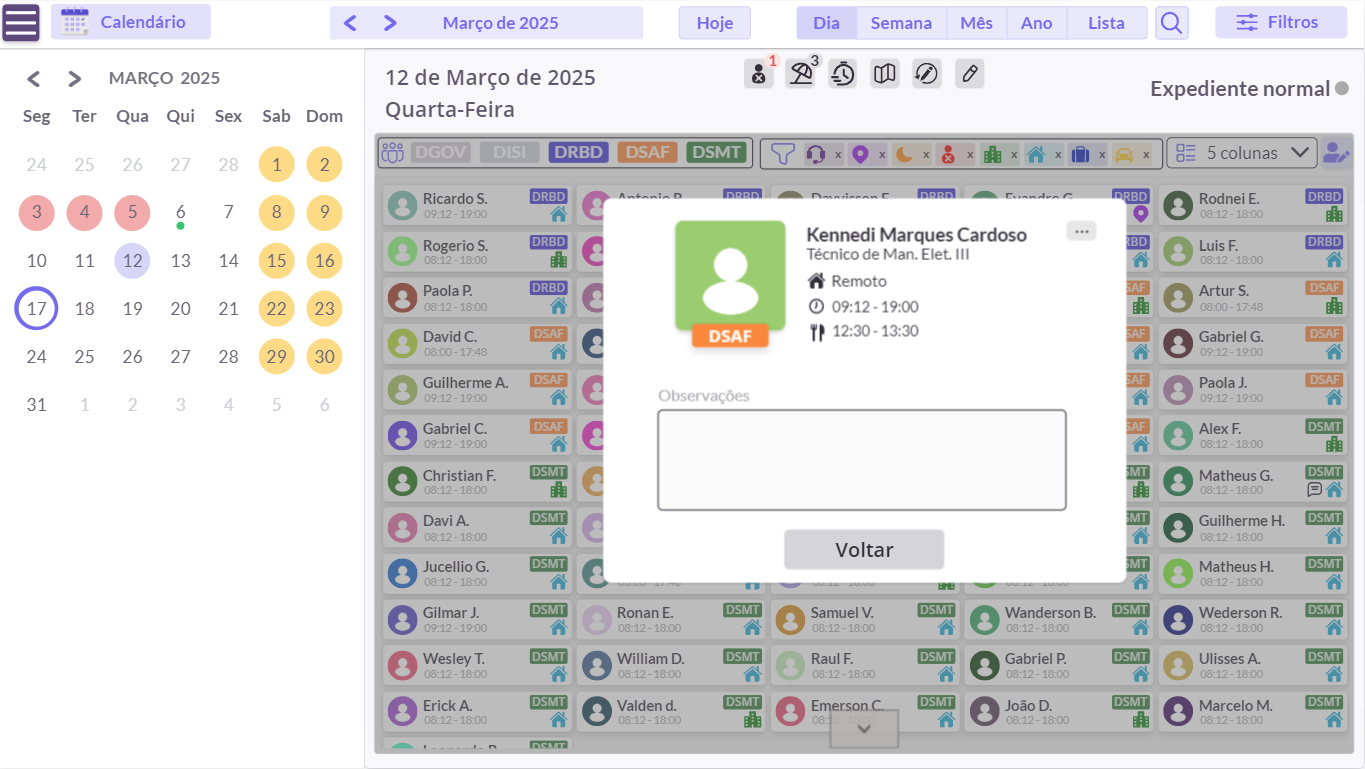
An Interactive Calendar
Technicians and supervisors filter the calendar by date and by team to see who works when, at what times and how: on-site, remote or external support. Each day can carry notes, and holidays, leave, sick days and time in lieu sit in the same place instead of separate files. Admin profiles maintain the schedules, and every change is kept in the history.
Microsoft Teams Integration
Power Automate copies each technician’s on-site days into their Microsoft Teams calendar and sends a reminder before every weekend or holiday shift, so nobody has to check the roster to know they are on duty.
Beating the Data Retrieval Limit
Power Apps only retrieves a limited number of records per query — around 500 — and a roster with one row per technician per day hits that quickly. Instead of one row per shift, I stored each day’s roster as a single JSON record, organised by team.
The app stays fast, and the history can keep growing without hitting the limit.
What Changed
The spreadsheet and the loose records went away, supervisors spent less time keeping the roster up to date, and the app was praised across the IT department.