Insight 03 Browser Extension
Helpdesk Automation Extension
Opening and closing a ticket in the service tool required multiple manual steps, with no telephony integration. A Chrome extension turned those flows into single actions — and it is still in daily use.
Context and Opportunity
At the Public Prosecutor of Minas Gerais (MPMG), the helpdesk dealt with high-volume requests via phone and other channels. Opening and closing a ticket in the service tool required multiple manual steps. There was no native telephony integration, so agents had to open the ticket screen manually after answering a call, which slowed first response. Under pressure, fields were forgotten, callers were misidentified and each technician filled tickets in a slightly different way.
Despite being a project I no longer maintain since leaving the organisation, the extension remains in active use by the team.
What I Built
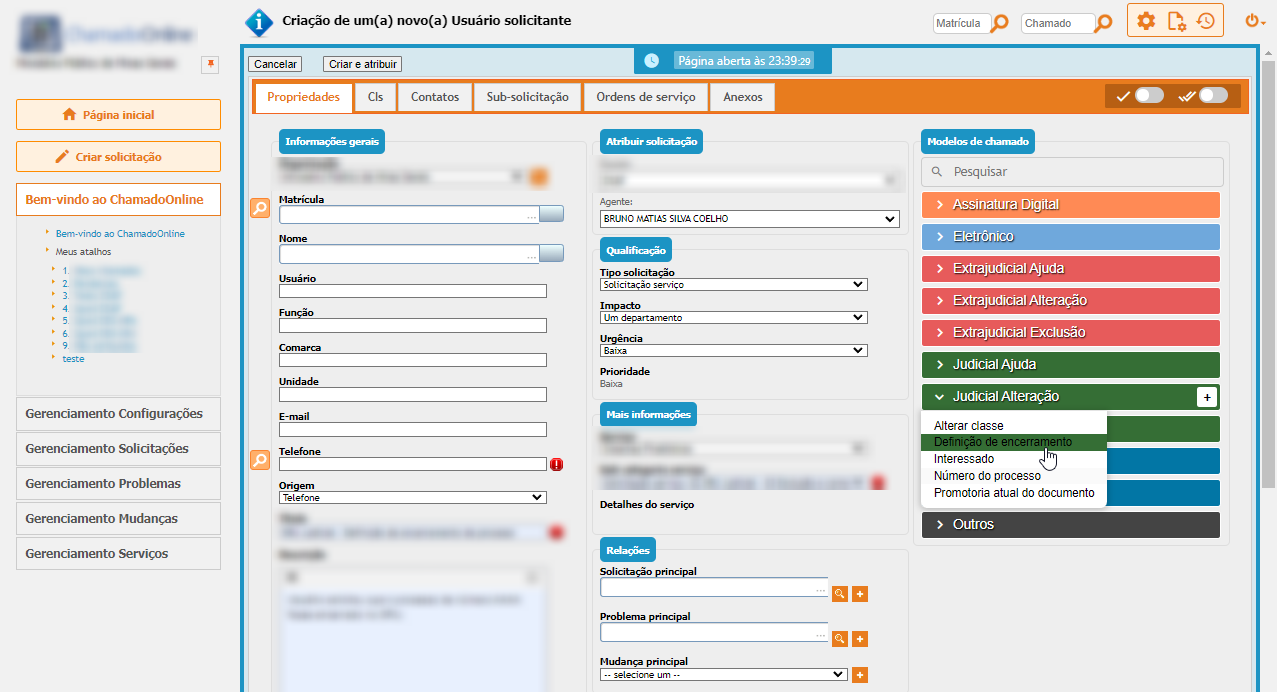
I developed a Chrome extension using JavaScript to interact directly with the iTop ticketing page. The extension automates frequent flows, standardises inputs with reusable templates, and connects incoming calls to the ticket form. To achieve some workflows, I used multiple hidden iFrame instances in the background to execute actions seamlessly, simulating the navigation that an agent would normally perform.
01Ticket Templates & Subcategories
Agents can create templates with subcategories that pre-fill fields such as title, category and description. Selecting a template applies the structure instantly, reducing typing and keeping content consistent.
02One-Click Multi-Step Workflow
Opening a ticket involved several pages. The extension compresses those steps into a single action: it creates the ticket, assigns it, advances to the next screen and completes the remaining required fields automatically.
03Telephony Screen-Pop
When a call arrives, the extension opens the “new ticket” page with the caller already identified: it reads the number from the telephony info page and uses it to find the user’s details, with no manual lookup.
04Search by Phone & History
A dedicated button searches recent tickets by phone number and lists the results instantly. Agents can review the history and proceed with more context.
05Auto-Resolution & Closure
Finalising a ticket also took multiple clicks (resolve → set resolution type → close). If the ticket was opened using a template, the same metadata is reused for the resolution, allowing true one-click closure with consistent outcomes.
06UI Tweaks & Governance
The extension introduced small usability improvements and allowed technicians to manage and update their own templates flexibly as new request types emerged.
How It Works
Built with standard Chrome extension patterns, the solution uses JavaScript content scripts to manipulate the live form, background pages with hidden iFrames to run multi-step actions, and event listeners to capture incoming telephony data. When the call info page is opened by the central system, the extension collects caller data from that page and auto-opens the ticket screen with those values pre-filled.
Impact
Agents could open, assign and close calls with far fewer clicks. Standardised templates ensured consistency in descriptions and resolution types, reducing errors and making records clearer for follow-ups. The integration with telephony gave technicians immediate context for every incoming call and eliminated the manual step of opening new forms.
Perhaps most importantly, every call got registered: even during high-volume periods when calls previously went unregistered or technicians lost track among many open windows, the extension guaranteed that every interaction was logged, creating a complete and dependable history.
Though no longer maintained, the tool remains embedded in daily operations — years after its creation.